after further discussion with @Jacob (he made one of the first Aces Ae tutorials out there) there’s a different workflow for this. tell me what you think @shebbe.
basically using this workflow:

which means I need to put on my linear sRGB assets an OCIO (if multipass then on the relevant passes with color information) linear sRGB->Acescg.
then I will make an ODT adj layer above all the composites with Acescg->linear sRGB and now the rocket look exactly like the original. so guess that’s my RRT?. now I know it looks right under the right color space conditions, and for an ODT I can replace it with the usual setup with a replacement of adjustment layer with Acescg->Log + LUT + GAMMAFIX, and use whatever export I need… if I would need anything “critical” I would have to place it outside, but for things that are supposed to be composited with each other I think this could work.
I made a template of a project to make sure I am doing this right. in here are all the main scenarios I think are common in a project. frame of each: arri, sony, psd photo, another one, and muiltipass one frame sequence. please have a look see tell me if this looks correct to you
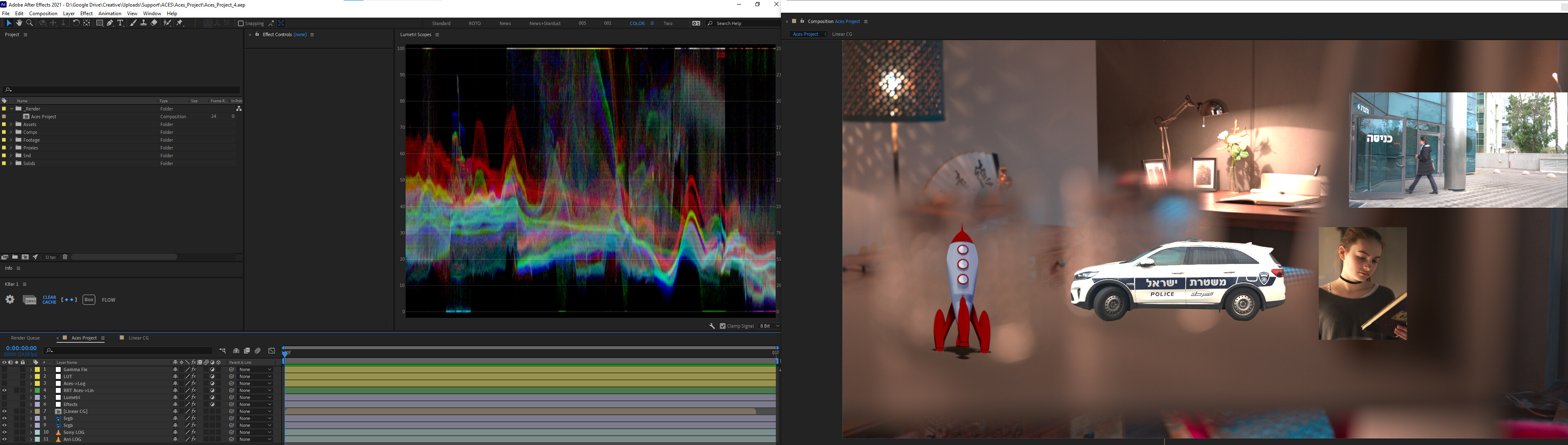
the RRT is for viewing how linear sRGB would look to make sure it’s right. turn it off and turn on all three adj layer to get the LUT look. leave just Acescg->Log and gammfix get a LOG export:
https://drive.google.com/drive/folders/1QuaYz23OT1CsLiEzJThm5hkieslUpyEO
more in this setup, a lumetri effect for color corrections between a sandwich of acescct for a predictable color corrections. all of this is just for educational purposes (mostly myself but when I get this right in the field I will make this available for others).
thanks